

 Skip to content
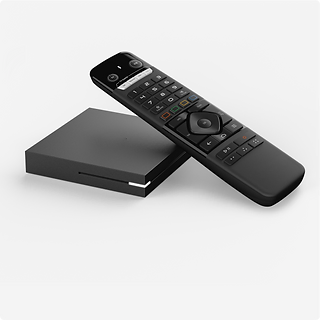
The Formuler S10 is a 4K Android-based IPTV streaming box built for live TV and on-demand content. It comes with Formuler’s MyTVOnline2 app, which is designed to make adding and browsing IPTV simple. This guide covers the general steps to get an S10 running and tips for a smooth experience. You can see the box on its product page.
Check that you have the S10 unit, the remote, a power adapter and an HDMI cable. Having your subscription details ready from your provider will save time later.
Plug the HDMI cable into the box and your TV, connect the power adapter, and insert the batteries in the remote. If you can, connect an Ethernet cable from your router, since the S10 supports Ethernet as well as dual-band Wi-Fi, and a cable is usually the steadiest option for live sports.
Turn on the TV, choose the right HDMI input, and follow the on-screen prompts for language and network. If you use Wi-Fi, pick your home network and enter the password, preferring the 5 GHz band when your router offers it.
Launch the MyTVOnline2 app and choose the option to add a portal or playlist. Enter the details your provider gave you exactly as written. Mistakes in typing are the most common reason setup fails, so double-check each field.
The first load can take a minute or two while the channel list and guide download. Stay on the screen until it finishes, then test a live channel, a sports channel and an on-demand title.
The S10 supports expandable storage, which can help if you install other apps. Keep the box software up to date from the settings menu, and remove apps you no longer use.
If you prefer voice control, the STV-BT1 Bluetooth voice remote is another option. Not sure which device suits you? Our Android TV guide and the shop can help you compare.
It uses Formuler’s MyTVOnline2 app, which is part of the box. Your provider supplies the details you enter in it.
Both work, but Ethernet is usually more stable, especially for live sports and 4K streams.
The S10 supports 4K output, but actual quality depends on the channel or title, your TV and your internet connection.
Use the contact page with your device model and a short description of the problem.
 Optimized by Seraphinite Accelerator